Showing posts with label MM. Show all posts

Assigning Purchasing Organization to Company code & Plant

To assign a Purchasing Organization to Company code:
You can either use the Transaction Ox01 or goto IMG and select the option as shown(This is done after going to transaction SPRO and selecting IMG).

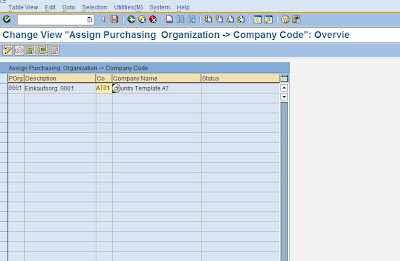
You will See the Purchasing Organization that is reated or which exists in the system(OX08).Assign the same to the neccessary company code.And save the entry.                                                                          


To assign the Purchasing Organization to Plant:
First goto to the same path in IMG(as shown earlier) and take the next option after the assignment to company code.This can also be done through transaction Ox17.Again, this is to be saved as a table entry.

Purchasing Organization

A normal Enterprise would look like this from a MM perspective


A purchasing organization is an entity or organizational level that negotiates conditions of purchase with vendors for one or more plants. It is legally responsible for completing purchasing contracts. In other words, a purchasing organization is the entity that procures materials and its related services, negotiates conditions of purchase with vendors, and bears responsibility for such operations or transactions.


The form of procurement is specified through the assignment of purchasing organizations to company codes and plants or either one of them.


The form of procurement is possible in following ways:
1)Enterprise-wide: One purchasing organization procures for all the company codes of a certain client (that is, for all the individual companies of a certain corporate group) .


2)Company-specific: One purchasing organization procures for just one company code .


3)Plant-specific: One purchasing organization procures for one plant .


Mixed forms are possible, which are replicated in the system with the aid of reference purchasing organizations. This could be more specific ones.


A purchasing organization can exist without being assigned to a company code. Since each plant must be assigned to a company code, the company code can be determined via the plant.One plant can have one or more Purchasing Organizations.Each purchasing organization has its own info records and conditions for pricing.Each purchasing organization has its own vendor master data.Each purchasing organization evaluates its own vendors using MM Vendor Evaluation.


To create a Purchasing Organisation in SAP:

This is possible through SPRO or directly through the transaction Ox08.

The path that needs to be followed in IMG is as shown below(IMG->Enterprise->Definition->Materials Management->Maintain purchasing organization).The entry is maintained in a table format.


Related Posts Plugin for WordPress, Blogger...